
New features for IPR 3.6
- IPR 3.6 standard UI style
- New security
- Single Sign-On (SSO)
- Audit trail
- A replacement for FTP
- FileStore and document publishing
- New Faceted Search
- Micad Analytics Centre
- IPR 3.6 Explorer
- IPR 3.6 Maps
- Micad360
- An all-new universal Drawing viewer
- NHS ERIC 2020
IPR 3.6 update
IPR 3.6 is the Micad property management system with a fresh new interface and yet recognisable user experience of 3.5. IPR 3.6 builds on the same foundation with added versatility of new technologies and browser platforms. New intuitive features are introduced to increased productivity and replace cumbersome legacy technologies.
This update features new ways to publish and manage files within the browser and presents more information at a glance in a redesigned screen layout. We make drawings universally accessible for all users with new responsive PDF drawing controls. Along with a new way for all users to instantly share and publish files using simple drag and drop. There’s new way to sign into IPR that securely provides instantaneous access. The new UI design is completely optimised and is more responsive across the entire system.
IPR 3.6 standard UI style
A new IPR 3.6 UI has been introduced with Microservices using Object Orientated Cascading Style
Sheets, this method can then facilitate the ongoing progressive enhancements for future releases.
The style guide forms the governance and policy documentation for all the elements that make up
IPR’s interface. A standard for the look and feel that can be tested against to ensure consistency.
IPR 3.6 operational interface
For IPR 3.6, every page has undergone UI and UX alignment with the new guide. IPR’s traditional
location ribbon and left menu are now accommodated within a new formal screen layout. This new
scheme adopts an aesthetic standard structure comprising, header, central article and left and right
side menus. The asides can be hidden or expanded to enhance the efficiency of the central activity;
both have neatly collapsible panels for when extra screen real estate is required.
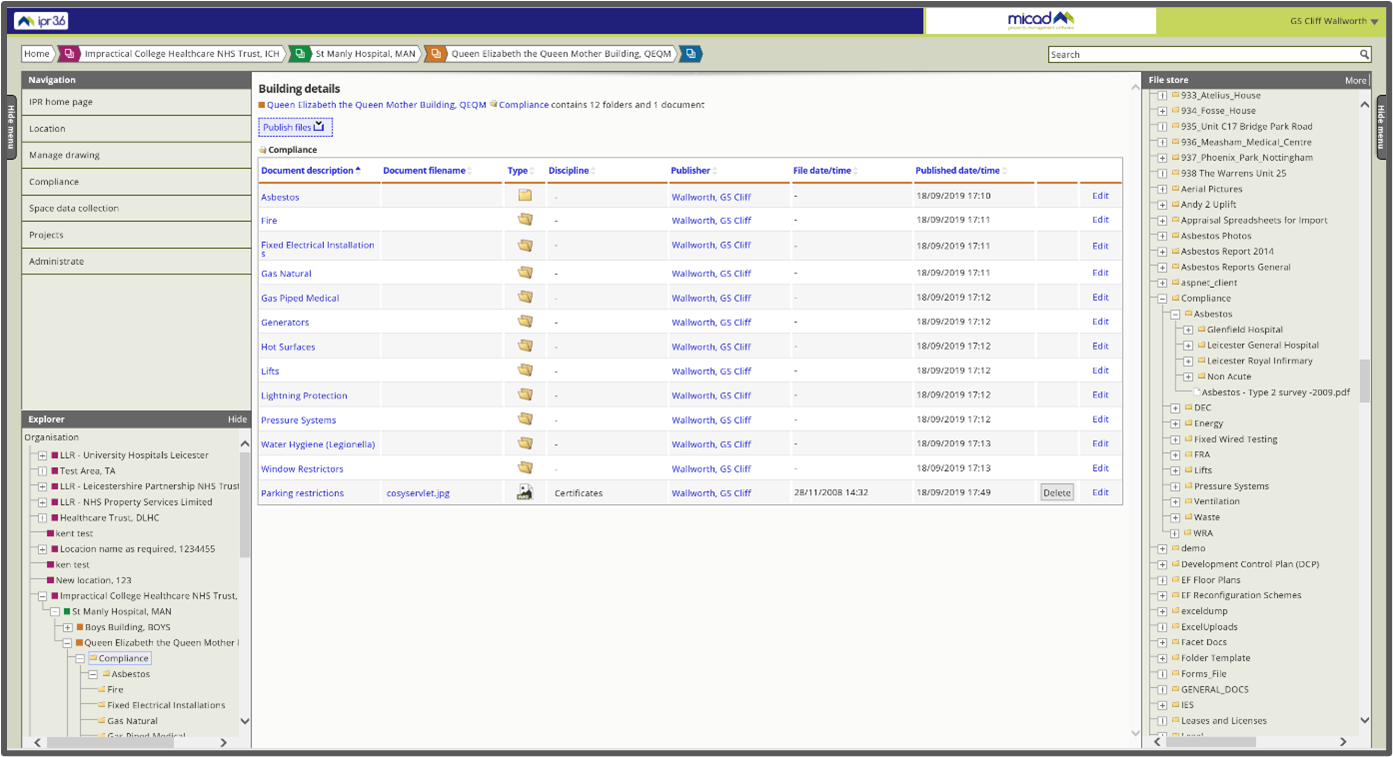
The new IPR 3.6 screen layout with a fixed header with dynamic content and aside menus
New Security
IPR 3.6 has a completely new security platform and has been provisioned using the latest durable
Azure cloud infrastructure technologies, Kubernetes. Now delivered over TLS 1.2, IPR 3.6 features
anti-hammer, password salting and hashing and support for Single Sign-On.
With our new FileStore we forego the need for (S)FTP access ports for either client or server.
FileStore also has its own gateway Intelligent Content Management filtering.
New levels of accountability are captured at the code level, each event triggers formatted signatures to
record all database access, modifications, and new content. For the user, this means there’s a
unified view of IPR data and FileStore’s hard disk folder and file exchanges.
Single Sign-On (SSO)
Single Sign-On (SSO) is an authentication process that allows a user to access multiple applications
with one set of browser login credentials. Conversely, Single Sign Off is the action of signing out
terminating access to multiple software systems in one go.
The benefits for IPR 3.6 users:
- Cure for password fatigue
- Eliminates password resets
- Centralises the management, monitoring and auditing of security credentials
- Reduces the administrative overhead
- Cost savings
IPR 3.6 is compatible with modern web browsers that support Security Assertion Markup Language
(SAML) SSO tokens. Google or Microsoft 365 account holders may choose to benefit from instant
single-click access to IPR 3.6. Clients may also choose to keep their classic logon username and
password methods if they prefer.
There’s a full step by step user guide Micad Single Sign-On (SSO) Guide.
Audit Trail
Change control and policy play a crucial part in space management. However, lack of knowledge or
lapse in communication takes place when drawings become changed without supervision. The
effects are often not evident until much later when it is too late to do something about it. The scale
of impact on space deletions is often unappreciated and the quality of the data is depreciated
significantly. Once realised, the effect of deletion and change can cause dramatic distress for clients.
For IPR 3.6 the challenge was to produce a meaningful detailed audit for all user transactions. One of
the most complex scenarios is to evidence changes derived from space records in the AutoCAD asbuilt drawings. This level of accountability warranted a collection of new security-relevant tools.
Activity data is quickly accessible from either pre-sets, day, week, month or between any given start
and end dates. All transactions may be traced for individual people and the data state reviewed as
snapshots of before and after.
You can access chronologically each record for documentary evidence of the sequence of activities
that have affected data at any time for any specific operation, procedure or event.
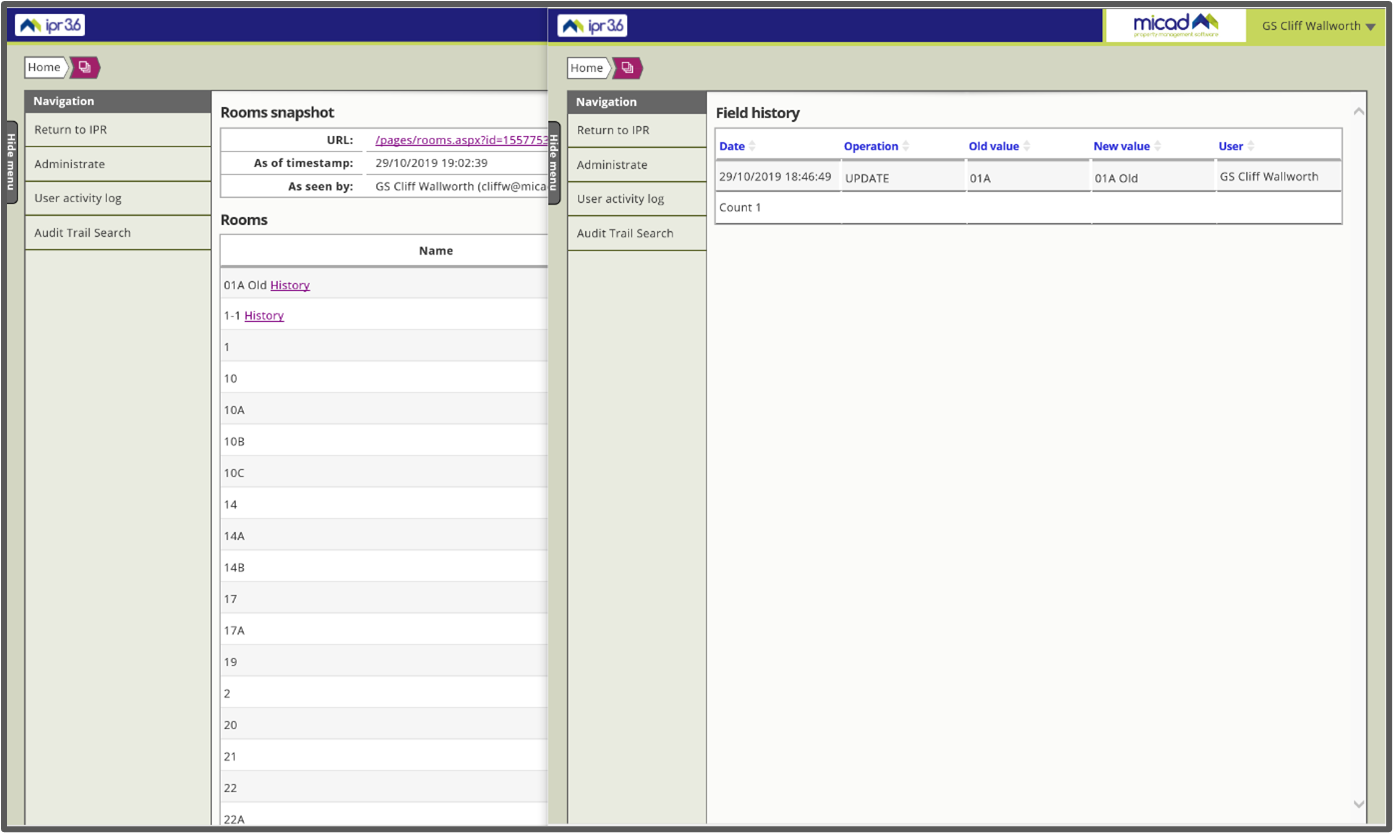
The Audit log Snapshot shows a History link where changes occur.
The new Audit Trail Search provides the advanced tools needed to focus in on specific activity on
valuable data. In this scenario, rooms were changed in IPR. I’m able to track the ‘name’ field so that I
can see activity relating to my space records.
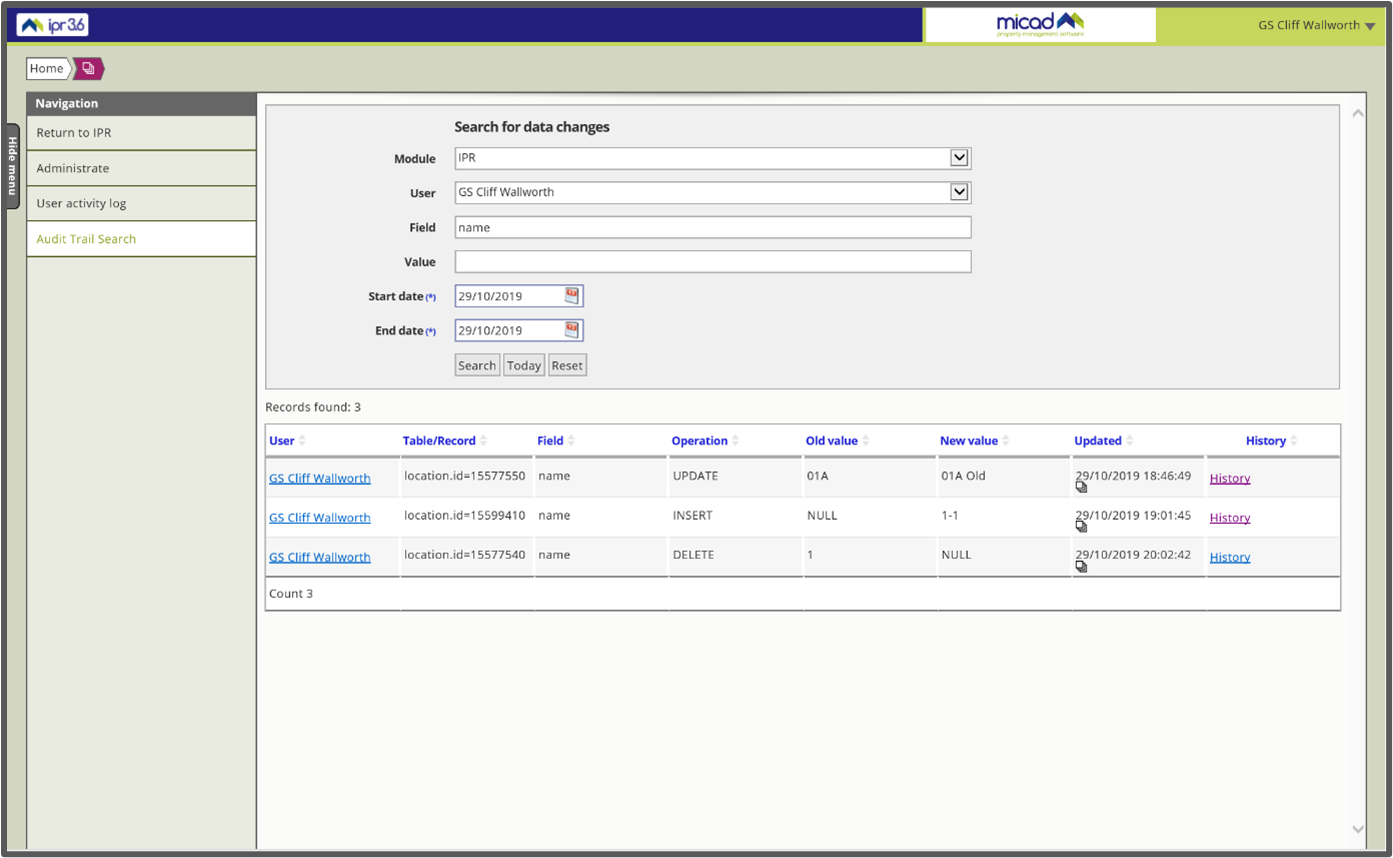
Use the Filed ‘name’ to view changes including new, edit and delete transactions.
FileStore Log
FileStore Log is a new central application that logs and displays all hard disk activity on your IPR
System. You can track your disk activity, across realistic file management scenarios that model actual
day-to-day usage as well as being able to search and filter.
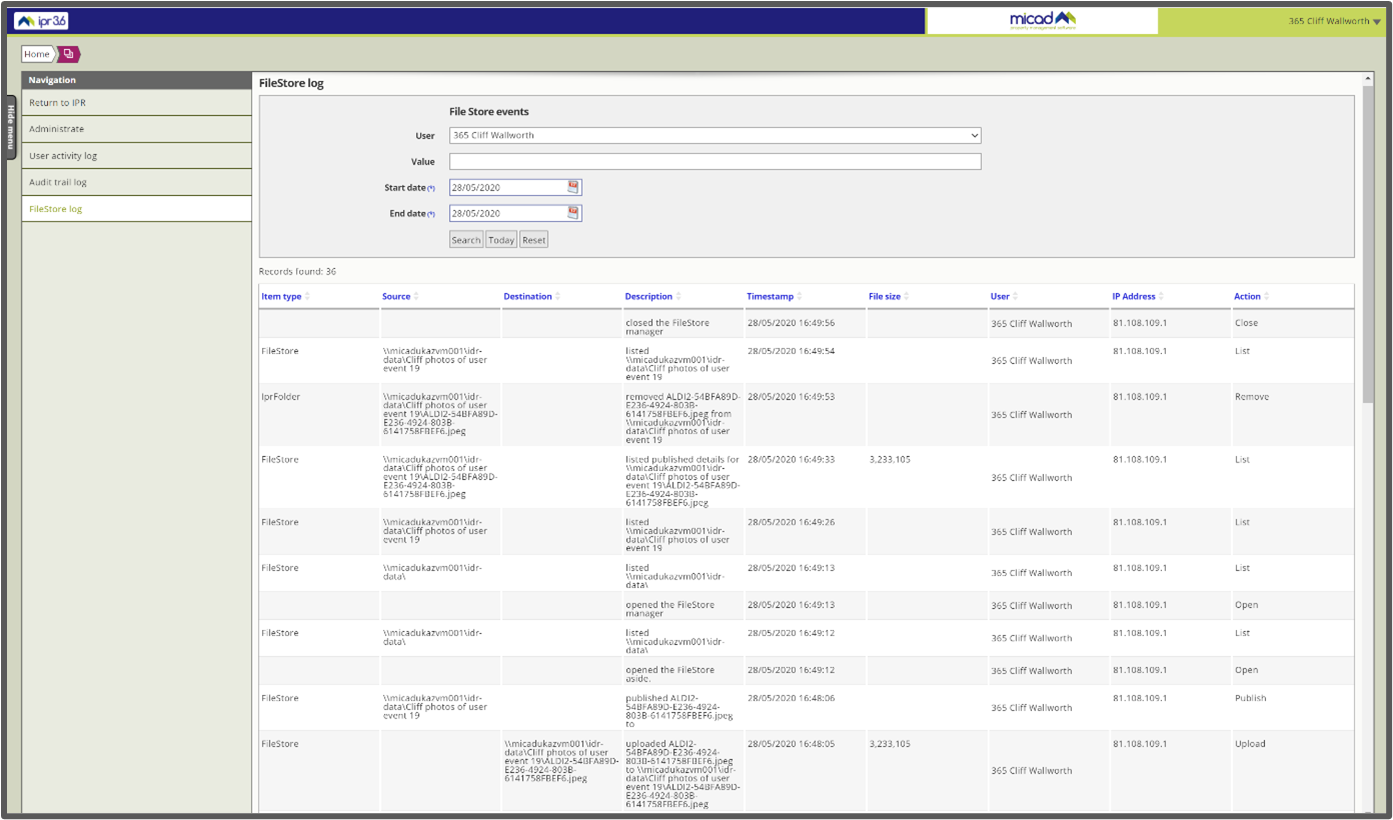
The System administrator’s view of file management activity using the new IPR 3.6 FileStore Log.
A changelog provides accountability, fundamental to disk storage and access transactions.
- Open – User session has begun and access the disk contents has commenced.
- List – User has viewed the contents of a disk folder, each folder visited will be individually
listed. - Upload – User uploaded a file and the file is stored on the disk in its original name.
- Rename – User has renamed the original file name and the file is stored on this disk in the
new name. - Move – User moved a file or folder.
- Publish – User published the file in IPR.
- Remove – User removed (delete) the files and folder from disk, removing also from IPR.
- Close - User session has ended from disk access.
A replacement for (S)FTP
IPR 3.6 is a property management system that allows for the collaborative exchange of drawings and
other documents that relate to the built environment.
For the past 20 years, the interchange of files used a secondary process called FTP (File Transfer
Protocol) to upload and perform file management. Once the files are placed on the server hard disk,
a secondary publishing action was then required to add the files to the IPR software. Many users
found the dual transaction process to be challenging and laborious.
Today FTP technology is legacy and requires IT support during implementation and approval to clear
information governance.
IPR 3.6 has a replacement for FTP with a new Micad technology we named FileStore. FileStore
swiftly combines file transfer and publish actions as one transaction and still provides the
management tools needed to create well-ordered disk content without IT contention or
involvement.
FileStore logs all disk files which means systems upgrade from IPR 3.5 do not need any special
preparations or changes their existing file system. Once complete, administrators will be able to fulfil
their long-awaited disk housekeeping desires without any fear of breaking links to IPR.
FileStore and document publishing
The new FileStore gives you the ability to manage your files with drag-and-drop functionality from
your desktop browser in the IPR in one process. Your files are automatically uploaded to the cloud
and immediately published to IPR locations and folders.
There’s a full step by step user guide IPR 3.6 FileStore Guide 1.1
New Faceted Search
IPR3.6 has a rebuilt search engine for searching across modules. Our new approach introduces a
framework forming explicit formatted views of information.
The custom content of IPR system data is not solely quantifiable by a popularity metric of web page
hits. We needed to define the context of a user’s query by facet, so we introduced the concept of
modular search collections each with specifically formatted layouts that complement trade or
discipline. Each modular facet has its purpose-designed results with its own hit counts. Collective
content allows you to discover related content across multiple facets, permissions respecting. You
can access and filter data (meta), description, filename & folder, keywords, disciplines, publishers,
organisational contract, full location hierarchy, departmental hierarchy, dates and document types.
A new free text search engine simplifies access using typed matches that closely resemble the
behaviour of commercial search engines. As well as single term search, deeper analysis is achieved
using multiple terms, grouped phrasing and you can use Boolean operators AND “ “ and NOT (-) too.
With IPR 3.6 Search we bring a brand-new concept we have named “Searchbar notation”. With
Search Notation users can also request specific content from the named facet or module. Search
notation also allows access to IPR’s space data and it's possible to build intelligent logical operator based queries to retrieve space data as simple tables.
For those interested in finding particular graphical content within AutoCAD drawings, it is now
possible to use the new CAD facet tab to search inside the plans for Layouts and Layers. Matched
results allow you to choose to open and view the drawings in the Layout identified. This graphical
reporting feature is also supported by Search Notation and connects the process requesting pre-set
layout views into simple IPR hyperlinks.
Associative search alias. We added aliases allow the search to index content with alternate or
names. The alternate content automatically suggested name alias can also be mapped to more than
one option.
Search UI is redesigned completely and users with permissions will see tabs for facets and modules.
We included a Help tab for access to “How to guides” and Recent Searches tabs for your search
history.
IPR search data is straightforward and easy-to-consume content so we implemented infinite scrolling
to assist in delivering a high volume of content. Infinite scrolling has been implemented to assist
where results go beyond the page extents, mechanisms are employed to view subsequent values.
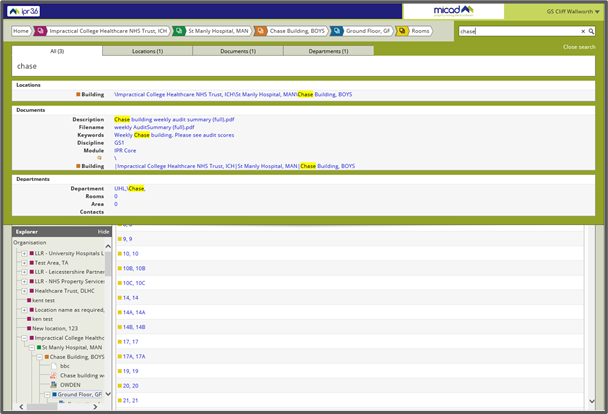
IPR 3.6 New Faceted Search interface displays results tabbed by special interest categories.
IPR 3.6 Explorer
The Client’s favourite IPR Explorer has now been integrated throughout IPR, extending the flexible
experience and “familiar” navigational course.
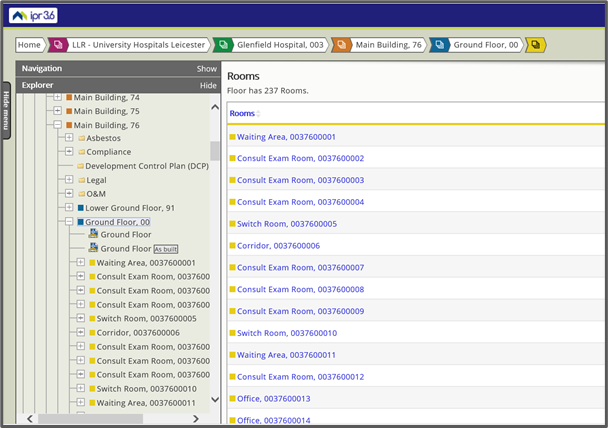
IPR 3.6 Explorer needs tabs from 3.5 – (Legacy functionality missing in this image that users will spot).
IPR 3.6 Explorer is brand new. We needed the latest software technology and architecture concepts
to deliver performance with real value. By designing out legacy obsolescence we’ve created a great
UX. The new platform experience isn't confined to desktop screens, for mobile devices the right-click
menus are accessible using ‘long press’ access.
Explorer sits (traditionally) on the left menu. Now it’s a panel that can be repositioned and docked
within either aside menu to improve data visibility and increase productivity. We’ve added quick
charts Analysis to Explorer and drag and drop functionality to expedite spatial allocation.
Department Explorer has been given its own panel, now users can navigate the departmental
hierarchy and view the department allocation from any IPR page.
The custom field query engine has been moved into the core IPR, this feature allows you to query
the system and find those locations with particular attributes, creating a flexible and extensive
methodology for moderating your data.
Maps for IPR 3.6
IPR 3.6 has a rebuilt mapping engine using web service canvas provided by OpenStreetMap (OSM)
for rendering. IPR’s spatial databases are now modernised to accommodate millimetre precision
World Geodetic System (WGS84) as its reference coordinate system.
The clean new UX, uses Point Markers positioned on the map directly from the Location aside menu
or you can use IPR Explorer’s to drag and drop. IPR can also request your position using device
location services to narrow down in the initial coordinate placement process. There’s no longer any
need to lookup postcodes or latitude and longitude, coordinates for manual entry in the Terrier
module.
We also are pleased to announce a design refresh for the user interface. Visual enhancements
algorithms declutter densely placed Point Markers and provide zoom-to actions without changing
the underlying data. Address details, Terrier data and a photo carousel display on the map in hover
menus when clicked. Preview menus appear while users ponder the Map data. Using the right aside
FileStore menu you can create Terrier photo collections using drag and drop photos making the
overall experience more intuitive and fluent.
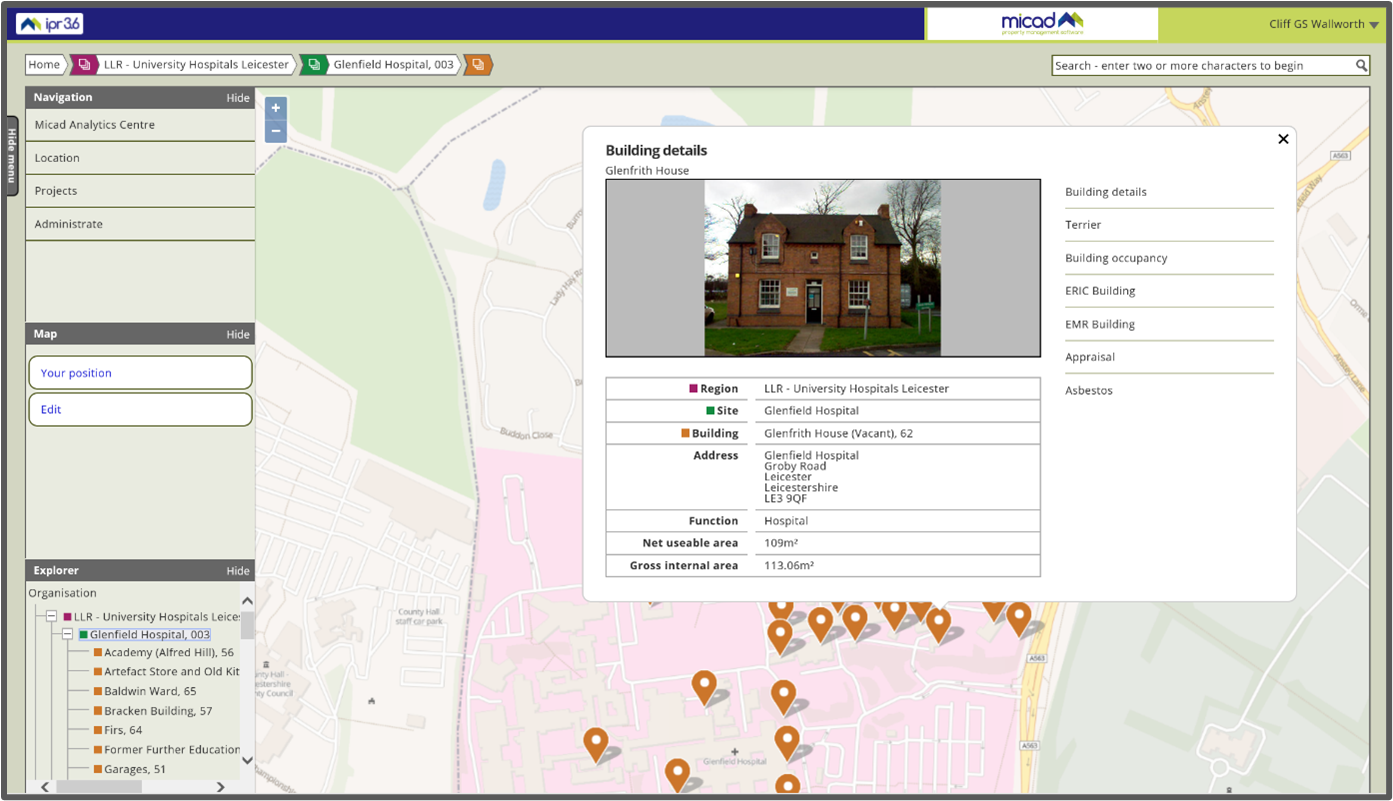
IPR 3.6. Maps, more intuitive, faster and with 2 cm accuracy of WGS84 (World Geodetic System).
Micad360
Micad360 is a fantastic new feature and is the start of great new evolution for IPR 3.6. 360-degree
photos simulate being a pivoted photographer and looking around to the left, right, up and down as
desired as well as zooming in. The viewer clicks any point on the image to drag it in the desired
direction.
Today a consumer priced camera with HD quality 360 costs as little as £400 and has built-in
technology that prepares the spherical images automatically. The resulting stitched JPEG images are
saved to your camera roll. The pictures can be uploaded directly by FileStore and viewed as 360-
degree photos in IPR. The journey can be achieved without involving USB drives, cables or PC
software file converters.
Micad360 provides the ability to remotely turn around, observe and locate building infrastructure
and the environment. Motion is achieved by linking a sequence of markers and series of panoramic
photos. Libraries of 360 photos provide the situational awareness for required for route planning,
wayfinding or personalised walkthrough scenarios that reinforce visible information value.
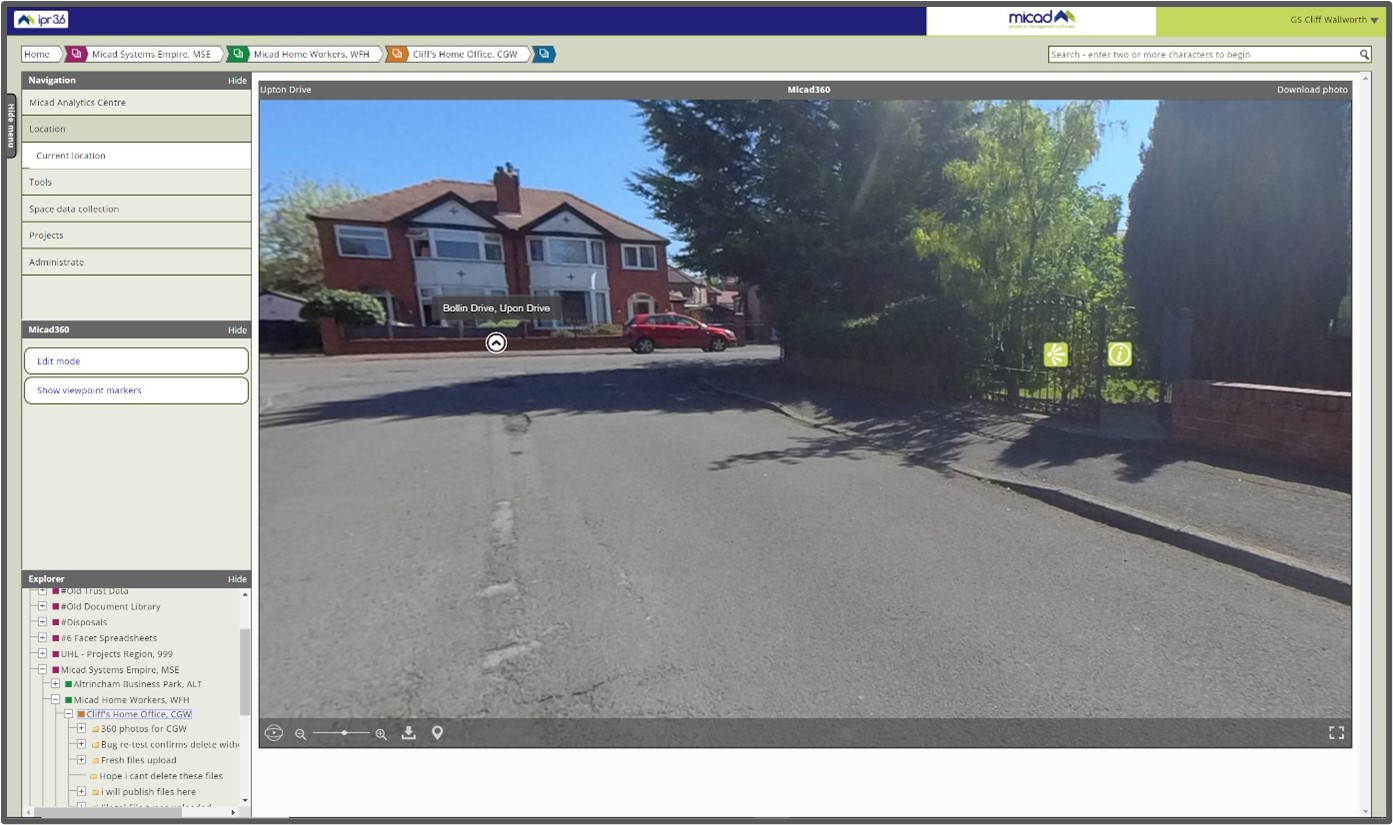
Micad360 links the 360-degree panoramas using viewpoint links and markers.
Micad360 is an immersive HQ panorama viewing experience of your estate, ideal to support
business continuity for anyone in charge of infrastructure management. Equipment position, assets,
fixtures, fittings and décor, or any given touchpoint where remote insight promotes better-informed
decision making.
CAD plans and new technologies
IPR has always been feature-rich with AutoCAD DWG drawings, this interactivity uses Autodesk’s
Design Review DWF tools (a Browser Plugin for Internet Explorer). We have kept this legacy feature
available (classic mode) for those that prefer to use Autodesk Design Review.
IPR 3.6 provides us with the latest tools to complement the new AutoCAD 2020 x64 drawing
compatibility. New features extend to browsers beyond legacy Internet Explorer and proprietary
viewer plugins. Modern web browser technologies also allow us to liberate new levels of
interactivity with drawings while escaping legacy constraints. A standard browser using native
technologies to render and print drawings including mobile.
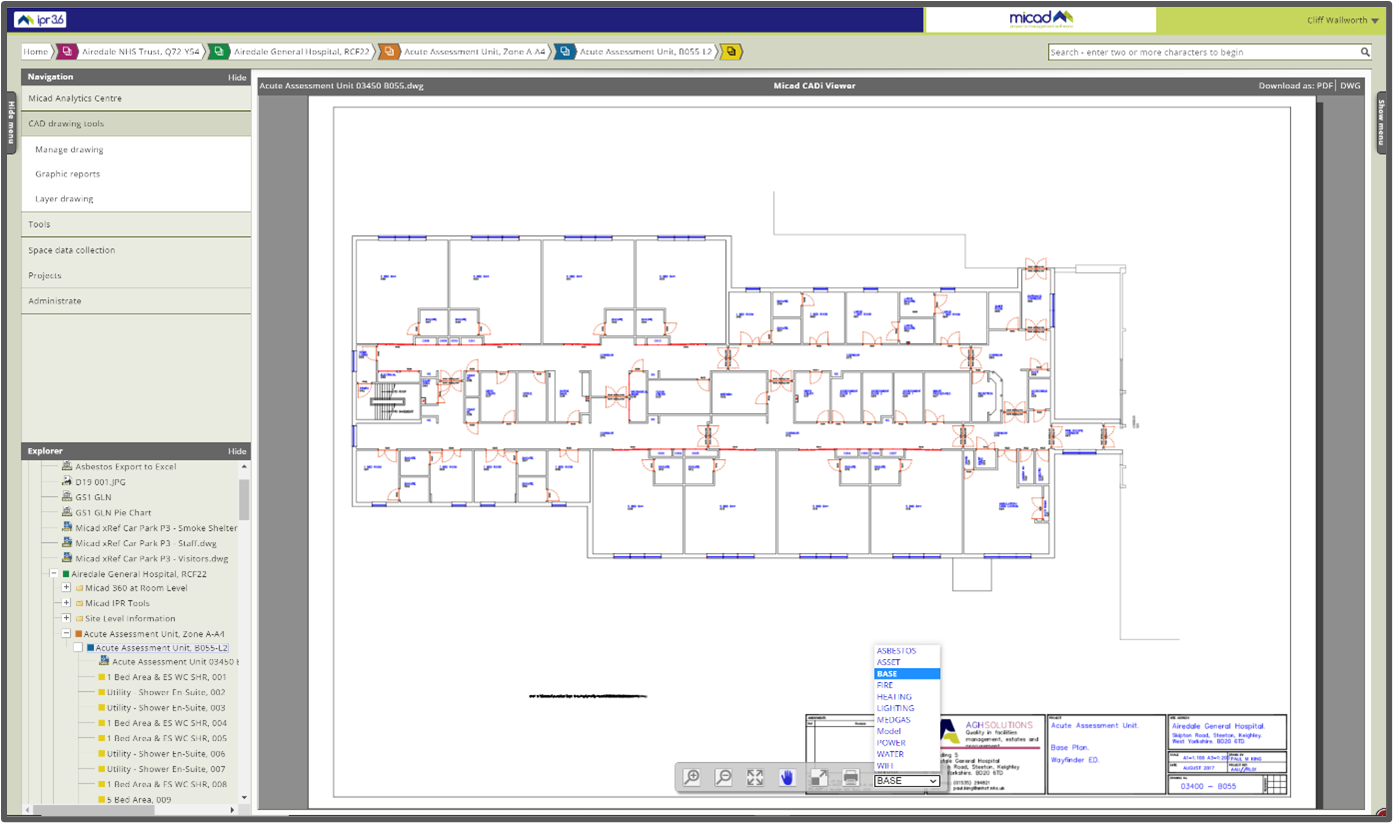
New IPR 3.6 universal HTML5 drawing viewer – Micad CADi Viewer.
There’s a full step by step user guide CADi Viewer Guide - Version 1.0
Micad CADi Viewer PC
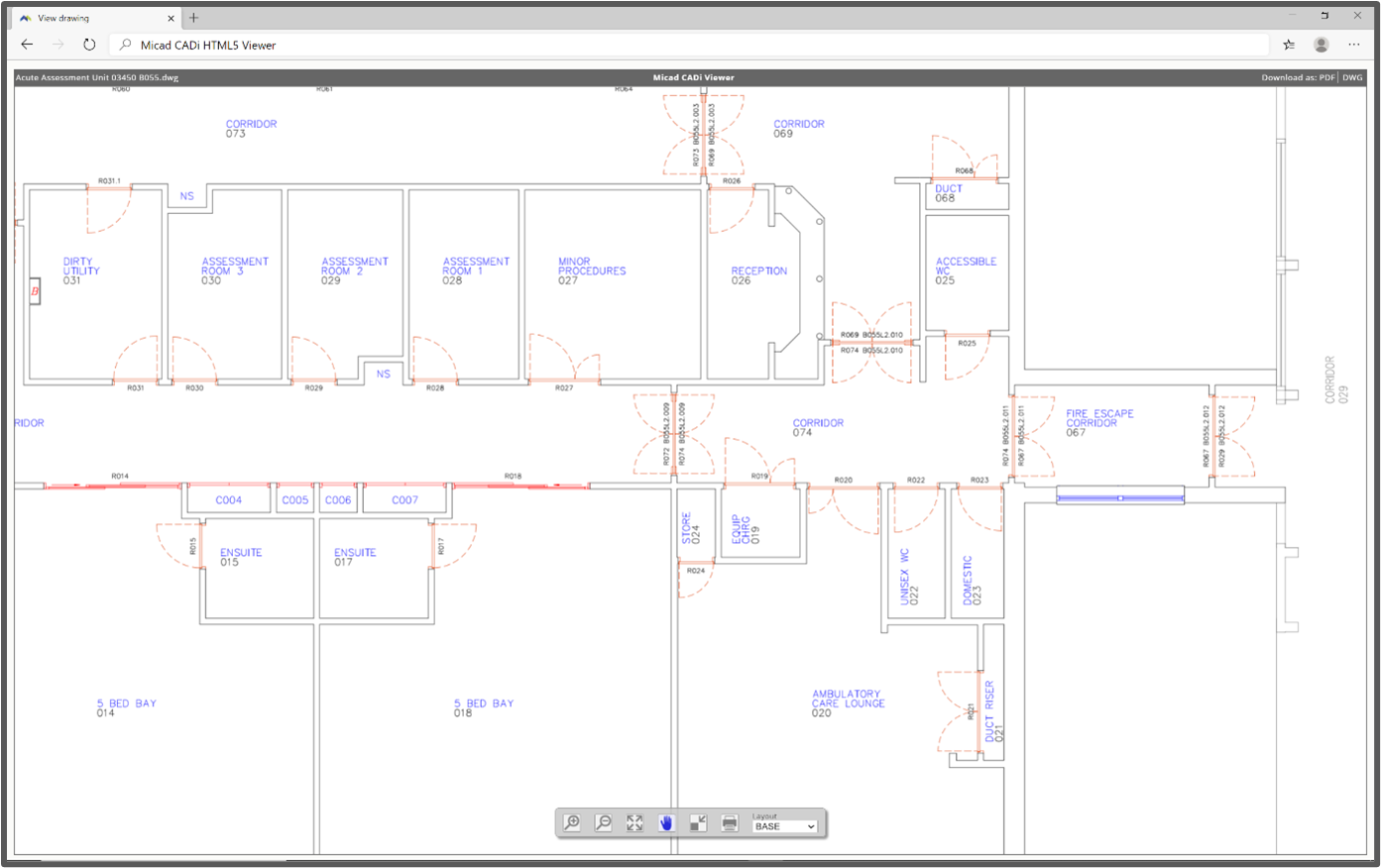
Full-screen mode on a desktop PC CADi Viewer is great for fine-detailed reviewing.
Micad CADi Viewer, excellent on iPad Pro
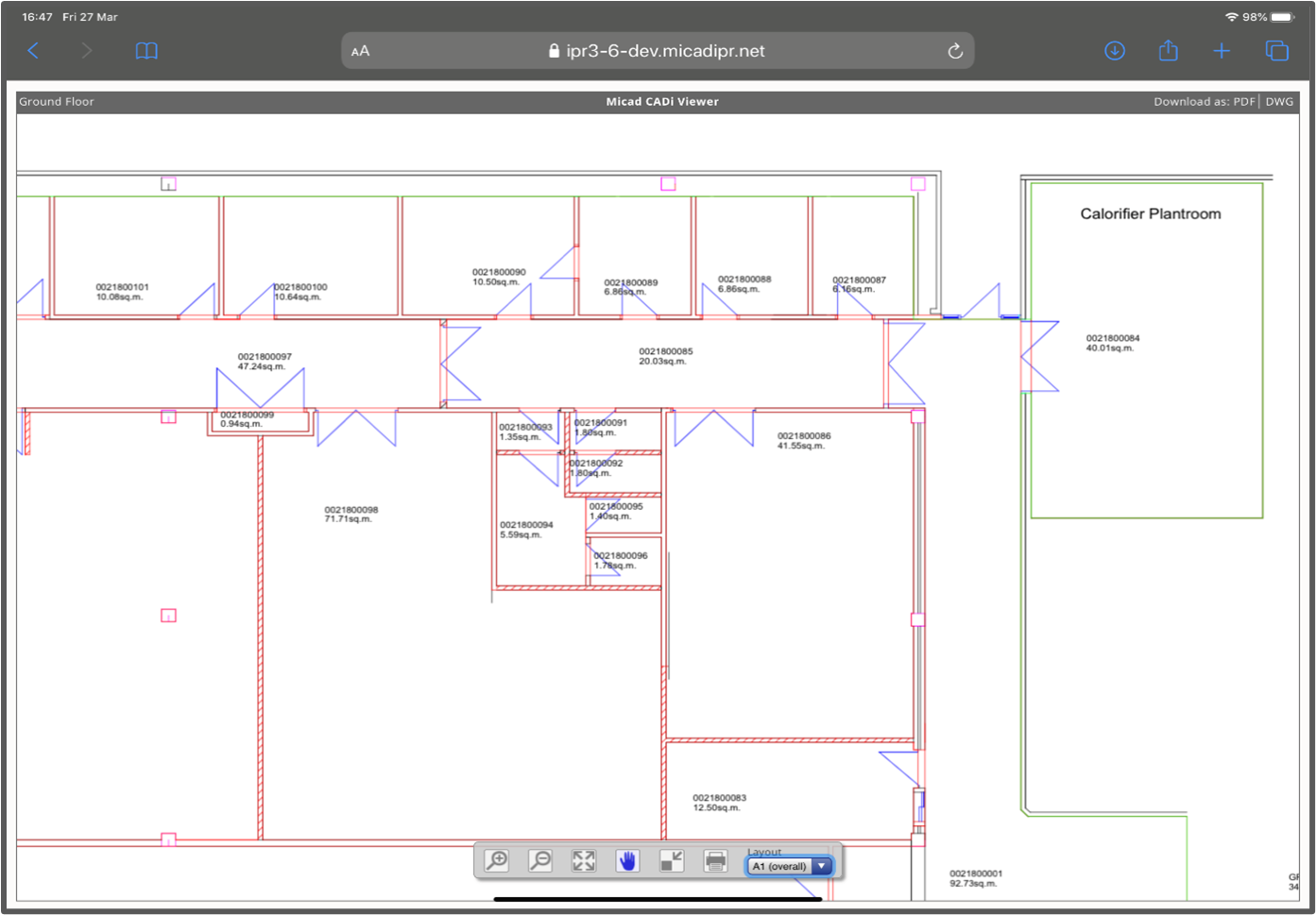
On the 12.9” iPad Pro in full-screen mode, CADi Viewer is fast and intuitive with new pan/pinch-zoom
gestures.
Download original CAD files in DWG or PDF direct from Micad CADi Viewer
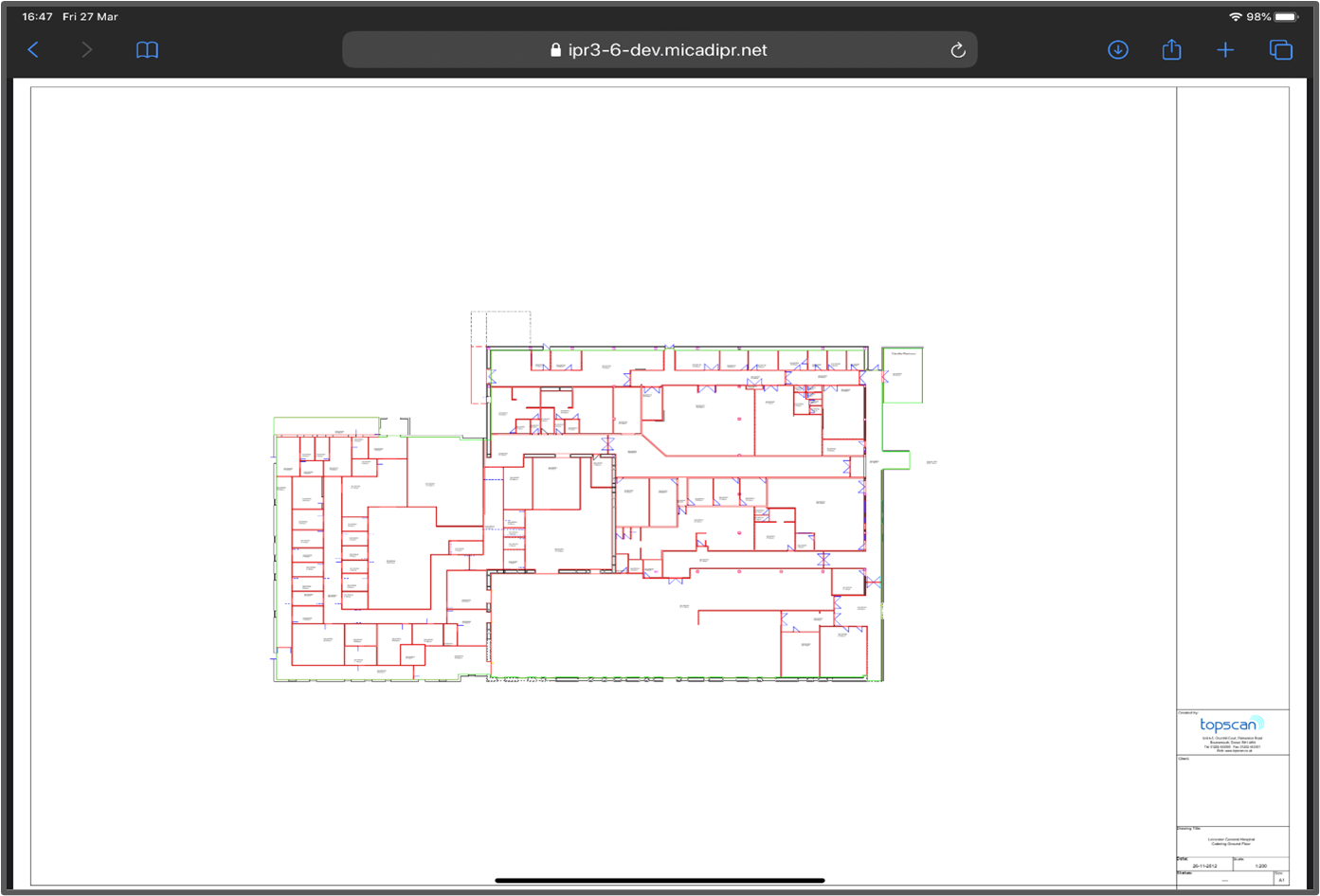
Download PDFs on desktop or iPad.
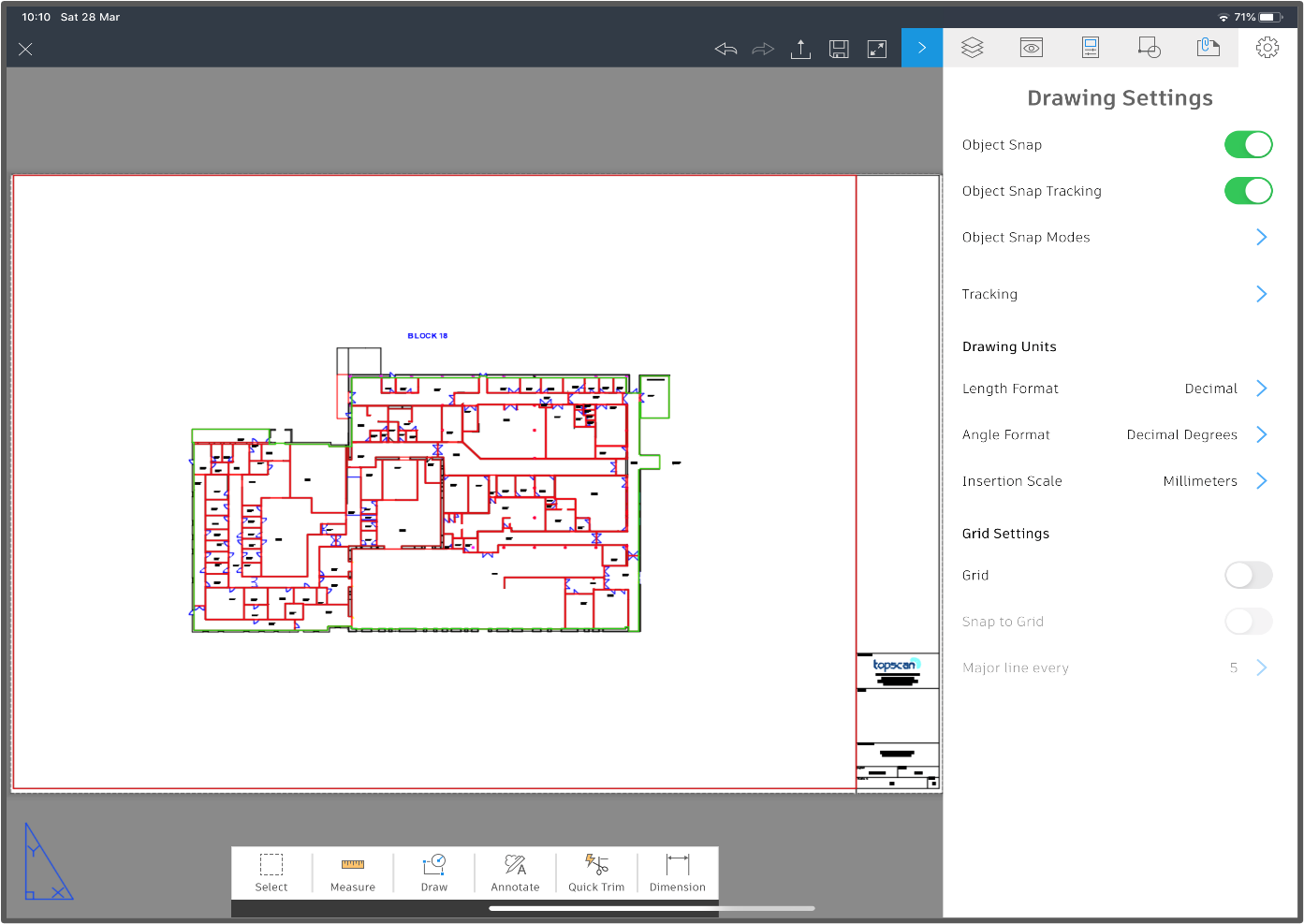
Drawings can be edited with AutoCAD for iPad.
New tools have been designed to reveal the drawing content and metadata. We can interactively
produce themed layouts using colour schemes and hatch patterns exactly as you would use in
AutoCAD.
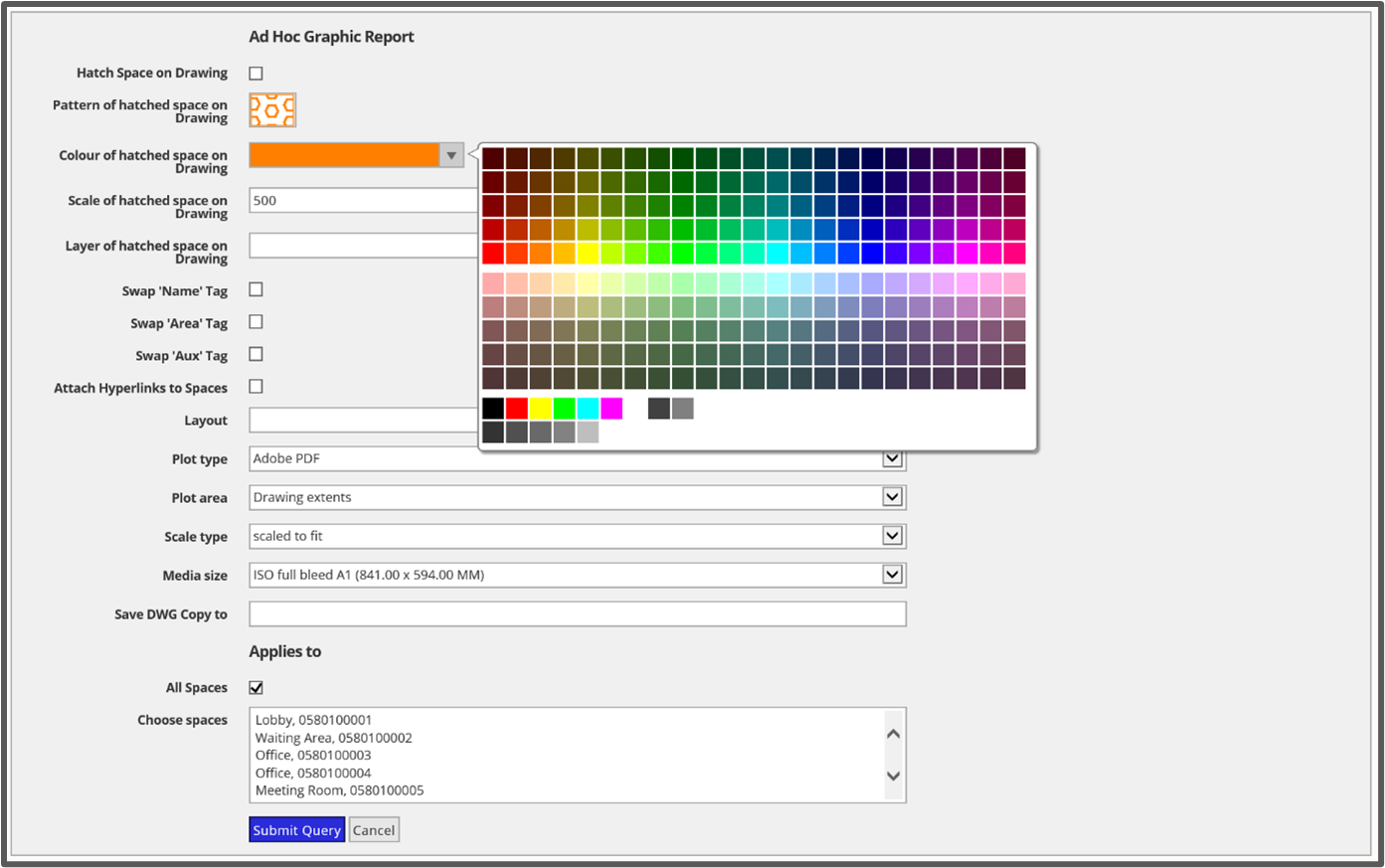
IPR 3.6 Graphic Report uses the AutoCAD 2020 colour palette.
New Analytics Dashboard (Micad Analytics Centre)
The Micad Analytics Centre (MAC) brings together dashboards from across the Micad software suite
into a single point of entry. MAC provides interactive visualisations on data within an interface
simple enough for end-users to create their own dashboards and reports. Users can view a library of
pre-designed charts and build dashboards for personal or communal use. Charts can be used more
than once and then customised within its specific purpose to focus on a top location, this allows for
side by side data comparisons.
The dashboard screen area uses a drag-and-drop snap grid for chart placement. The two-dimensional grid is resizable and responsive to device size and orientation. For many IPR users, the
interactive metrics data is the most intuitive means to access further depths.
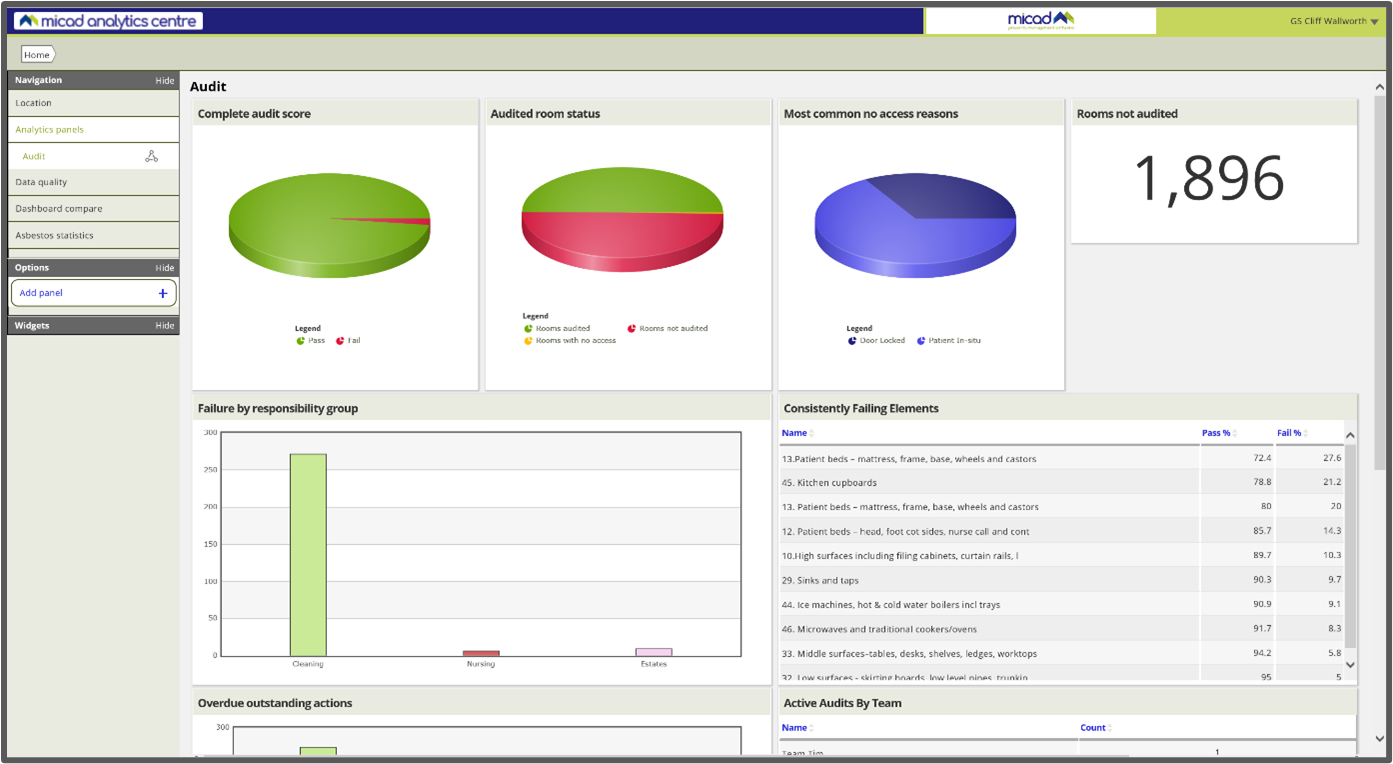
The Micad Analytics Centre shows dashboards form the Audit Module.
The MAC dashboards can be accessed independently from the core and modules. It’s now possible to
build data from specific or unrelated modules.
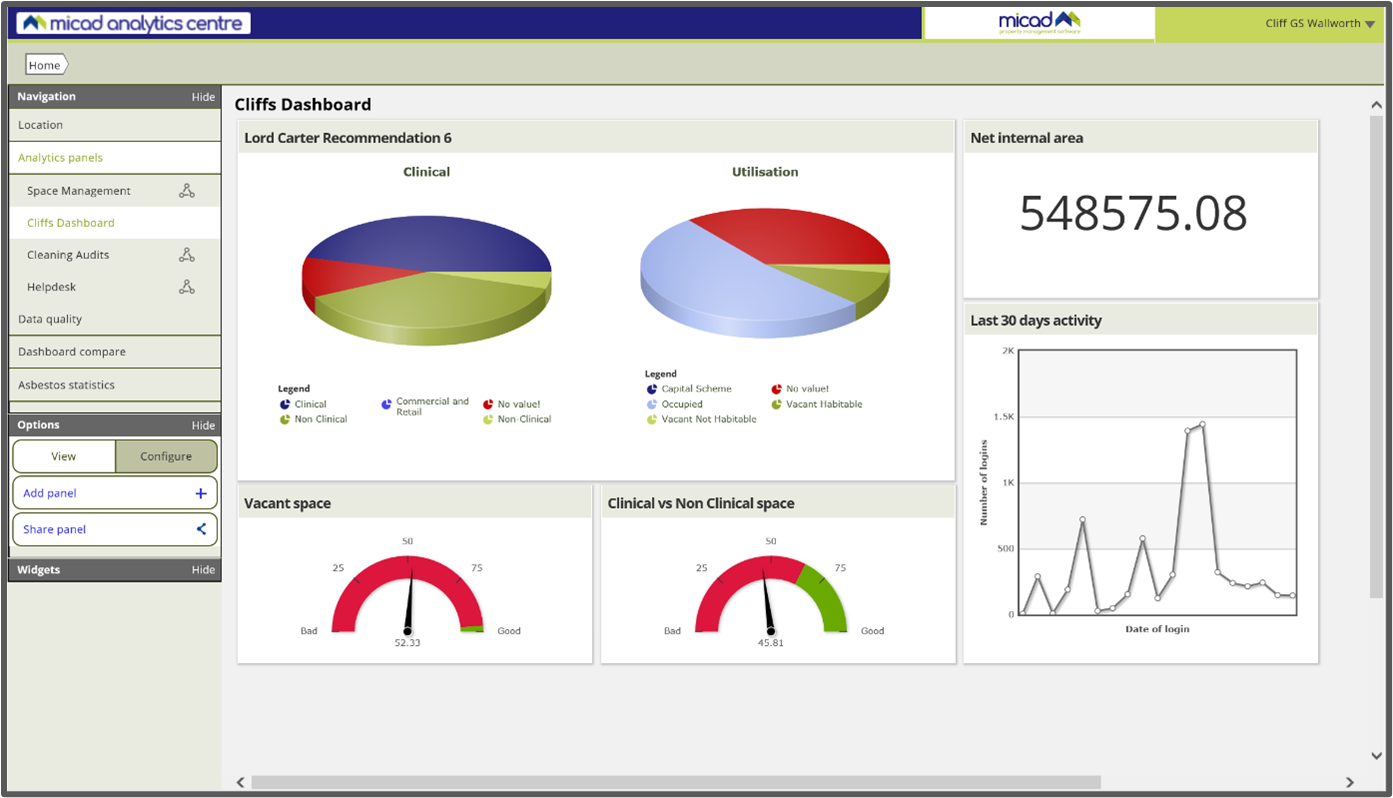
Here Micad Analytics Centre shows my own preferences built from IPR 3.6.
There’s a full step by step user guide Micad Analytics Centre (MAC) Guide - Version 1.0
NHS ERIC 2020
Micad ERIC space status is a spatial toolset put together to help complete the June 2020 ERIC definitions. This year (Site) S02 is formed of a series of Sq.m classifications in more detail than ever before. The data definitions are a challenge to understand and their verbose validation calculations are really quite confusing. Now is not the time to reshape and extrapolate last year’s figures. Users of the NHS Digital EFM portal will observe how variance checks are conducted as you type in the figures. This year’s definitions remind you that your data is to be retained and could be subjected to audit. To help you achieve such precise accountability, we have a pre-designed themed set of graphic reports that will render the drawings automatically to PDF (with legend), these can be downloaded and/or stored in the folders of IPR year on year.
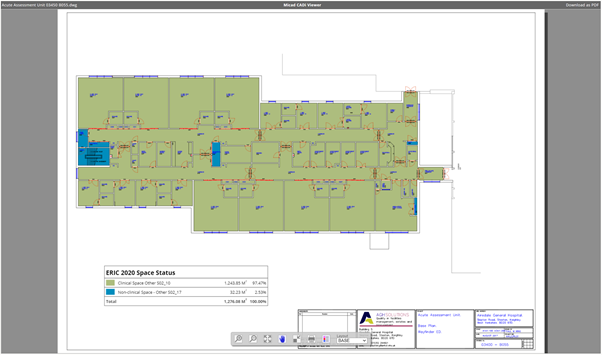
The themed floorplan is a great way to capture and archive your actual ERIC S02 values
Micad have introduced a simple Space Status to be applied, one value per space, each in respect of ERIC S02. In this release we create the room data fields required for you and we pre-load values ready for use. To help collect the many thousands of rows of data, we also prepared a data collection template.
With this new refresh our IPR ERIC productivity tools help expedite data collection, validate and demystifying the whole process. The final aggregated site results mimic the exact data fields required, comparable side by side of the EFM portal.
We have also covered the high-level level metrics to remind you of Lord Carter’s KPIs for Clinical vs Non Clinical & Unoccupied space (Unwarranted variation, recommendation 6).
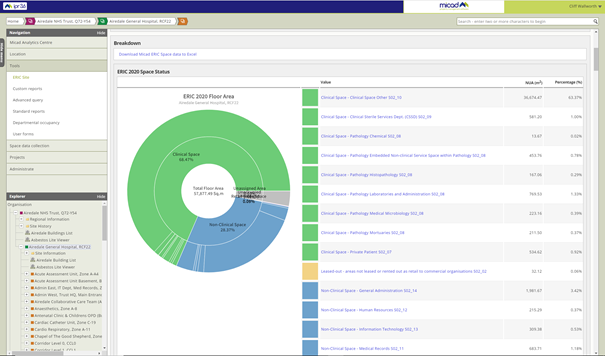
The ERIC space status shows S02_07 through S02_18 along and calculated Lord Carter KPIs
Comments
0 comments
Please sign in to leave a comment.